

I have built multiple Meteor apps where email was a core part of the user experience. At first, I went with the simplest path, which was Gmail SMTP or a custom SMTP setup. It worked fine in the early days. As the app grew, cracks started to show. That pushed me to rethink how I handle transactional emails in Meteor, and that is where Resend came in.
Once your app is ready to ship, you can deploy it to a platform like Galaxy, which is built specifically for hosting Meteor apps. With reliable hosting in place, the next piece worth getting right is the email layer, the part I had been treating as an afterthought for too long.
The Old Setup: Gmail SMTP in Meteor
In most of my early Meteor projects, I used Gmail SMTP with an app password from Google Workspace. The setup was simple and quick.
Here is the kind of setup I used:
- Configure SMTP credentials using environment variables
- Use Meteor Email package to send emails
- Trigger emails from server methods
Here’s my meteor app’s email utility,
import { Email } from 'meteor/email';
import { Meteor } from 'meteor/meteor';

// Common email layout function
const getCommonEmailLayout = (
content: string,
lang: 'en' | 'bn' = 'en'
): string => {
return `

Email

${content}

Best regards,

Team [YOUR_APP_NAME]
[YOUR_WEBSITE_URL]

© [YEAR] [YOUR_APP_NAME]. All rights reserved.

`;
};

// Email utility function (Gmail SMTP / Meteor Email)
export const sendEmail = async (
  to: string,
  subject: string,
  textContent: string,
  htmlContent: string
  ): Promise => {
  try {
    const fullHtmlContent = getCommonEmailLayout(htmlContent);

    const fromAddress =
      Meteor.settings?.private?.MAIL_FROM ||
      '[YOUR_APP_NAME] <your-email@gmail.com>';

    Email.send({
      to,
      from: fromAddress,
      subject,
      text: textContent,
      html: fullHtmlContent,
  });

console.log(`Email sent to ${to}`);
  return true;

  } catch (error) {
  console.error(Failed to send email to ${to}, error);
  return false;
  }
};

export default sendEmail;And here’s how my settings.json looks like:
{
  "private": {
  "MAIL_URL": "smtp://YOUR_EMAIL%40gmail.com:YOUR_APP_PASSWORD@smtp.gmail.com:587",
  "MAIL_FROM": "[YOUR_APP_NAME] YOUR_EMAIL@gmail.com"
}When using Gmail SMTP in Meteor, the key part is the MAIL_URL where your email and app password are embedded. The email must be URL encoded, so @ becomes %40. The password here is not your normal Gmail password.
It is an App Password generated after enabling 2-Step Verification in your Google account. This adds a layer of safety and allows SMTP access without exposing your main credentials.
For free Gmail accounts, there is a daily sending limit of around 500 emails. Google Workspace accounts can go up to around 2000 emails per day, depending on the plan. These limits can become a bottleneck as your app grows.
There is also limited control over delivery behaviour, retries, and tracking. This setup works well for small apps or early stages, but it starts to fall short when you need scale, observability, and reliability.
Key issues I faced with this setup:
- Daily sending limits became a blocker
- Emails started getting delayed during peak times
- Risk of emails landing in spam increased
- No proper visibility into delivery or failures
- No way to track opens or clicks without building extra layers
- Retry logic was hard to manage
Gmail felt like a basic post office. You send something and hope it reaches. Once you need control, insights, and scale, it starts falling short.
Why Transactional Emails Need a Strong System
Transactional emails are very different from marketing emails. These emails carry critical information and are expected to reach users at the right time.
Examples:
- OTP or verification emails
- Password reset links
- Payment confirmations
- Invitations and account updates
Key requirements I focus on:
- Reliable delivery without delays
- High deliverability with proper domain authentication
- Clear logs for every email event
- Retry mechanisms for failures
- Ability to track user interaction
If an OTP email is delayed or lost, the user experience breaks immediately. This is why the email system needs to be treated as a core backend service.
Why I Chose Resend
While exploring alternatives, I came across Resend. What stood out was how focused the product is. It does one job and does it well.
What I liked:
- Clean API with minimal setup
- Strong documentation that is easy to follow
- Built-in support for domain verification using SPF and DKIM
- Dashboard with clear logs and email events
- Developer-friendly SDK
Migration from Gmail SMTP was surprisingly quick. I was able to move my existing flows in a couple of days without major changes.
Resend also fits well with how modern apps are built. It gives visibility into every email that goes out, which makes debugging much easier.
Setting Up Resend in Meteor
Integrating Resend with Meteor is straightforward.
First, the Domain setup is important:
Domain Setup
- Add SPF records to your domain
- Add DKIM records for authentication
- Configuring DMARC is also important for better deliverability and domain trust, especially with newer Google and Yahoo sender requirements.
- Verify the domain inside the Resend dashboard
Here’s a peek into my domain setup screen in Resend,
SDK Setup In App:
Install Resend SDK in your Meteor server
- Store API key securely in environment variables
- Replace SMTP logic with Resend API calls
Here’s how my server-side email utility using resend looks like:
import { Resend } from 'resend';
import fetch from 'node-fetch';
import { getEmailTemplate } from './template';

const resend = new Resend(process.env.RESEND_API_KEY);

// Unified function
export const sendEmail = async ({
  to,
  subject,
  content,
}: {
  to: string;
  subject: string;
  content: string;
}) => {
  const html = getEmailTemplate(content);

  try {
    // 1. Try SDK first
    const sdkResponse = await resend.emails.send({
      from: '[APP_NAME] <no-reply@yourdomain.com>',
      to,
      subject,
      html,
    });

    return {
      success: true,
      source: 'sdk',
      data: sdkResponse,
    };
  } catch (sdkError) {
    console.error('SDK failed, falling back to API', sdkError);

    try {
      // 2. Fallback to direct API call
      const apiResponse = await fetch('https://api.resend.com/emails', {
        method: 'POST',
        headers: {
          Authorization: `Bearer ${process.env.RESEND_API_KEY}`,
          'Content-Type': 'application/json',
        },
        body: JSON.stringify({
          from: '[APP_NAME] <no-reply@yourdomain.com>',
          to,
          subject,
          html,
        }),
      });

      const data = await apiResponse.json();

      if (!apiResponse.ok) {
        throw new Error(data?.message || 'API send failed');
      }

      return {
        success: true,
        source: 'api',
        data,
      };
    } catch (apiError) {
      console.error('API also failed', apiError);

      return {
        success: false,
        error: apiError,
      };
    }
  }
};In Settings.json:
{
  "private": {
  "RESEND_API_KEY": "re_xxxxxxxxxxxxxxxxx",
  "MAIL_FROM": "[APP_NAME] no-reply@yourdomain.com"
  }
}Example flow:
- Create a server method to send email
- Call Resend API inside that method
- Pass recipient, subject, and HTML content
One important thing with Meteor 3.x is that the platform is now fully async with native async/await support after the removal of Fibers.
This makes integrating modern SDKs like Resend much cleaner since API calls can be handled naturally inside async Meteor methods, jobs, and server logic without older wrapper patterns or Fiber-based workarounds.
Using a dedicated email service with both SDK and API support makes the system much more reliable and easier to work with.
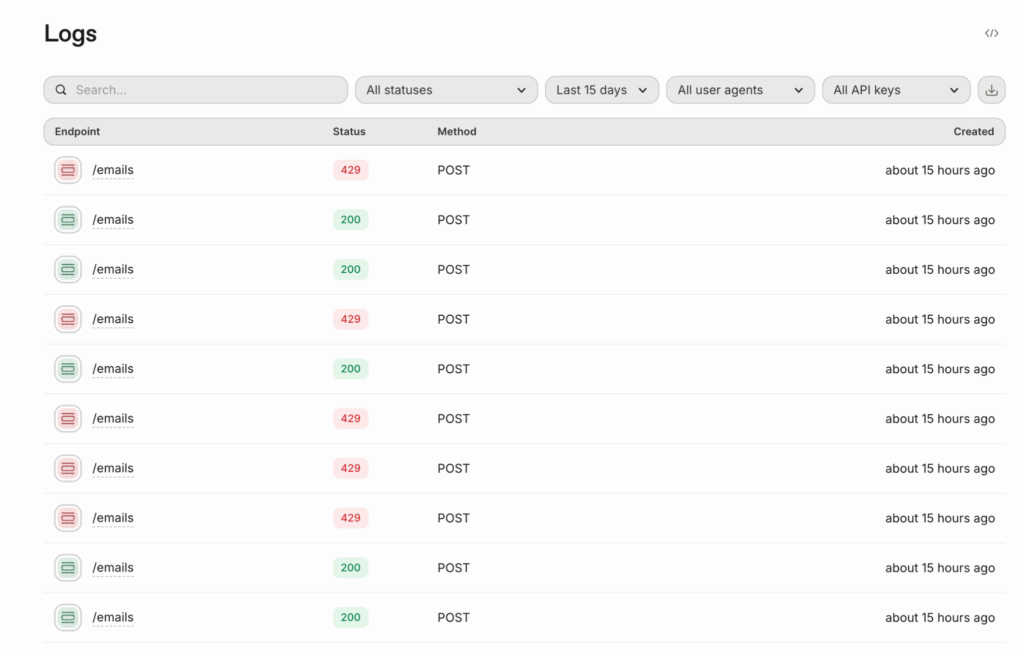
Voila, we have sent our first email, and the stats look like below in the Resend Email Insights page.
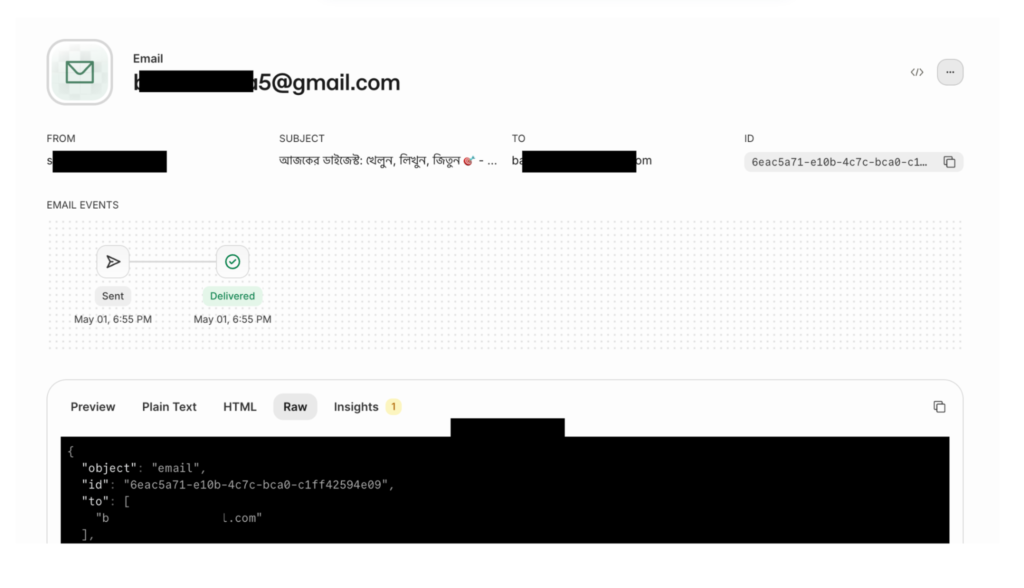
The SDK gives a clean and simple interface, so sending emails feels like calling a normal function with proper typing and structure. It reduces boilerplate and helps maintain consistency across your codebase.
On the other hand, having direct API access gives flexibility and control when needed, especially for custom logging, debugging, or fallback strategies.
This combination helps in building a more resilient system where failures can be handled gracefully. You also get better visibility into delivery status, errors, and user interactions, which is very hard to achieve with basic SMTP setups.
Overall, this approach improves developer experience, debugging speed, and confidence in your email delivery pipeline as your application grows.
You can also explore:
- Audience API: The Audience APIs are useful when you want to manage and organize recipients directly inside your email system instead of maintaining everything manually in your application database.
- Broadcast API: Resend also provides additional Broadcast APIs for scaling email workflows beyond single sends. For recurring campaigns or product updates, Broadcasts can be used for marketing-style communication across audiences.
- Batch Send API: For transactional bulk sending, the Batch API ( emails.batch.send ) is the better fit since it is designed for sending multiple transactional emails in a single request with better efficiency and control with a limit of 100 mails per request.
Observability and Debugging
This is where Resend shines.
With Gmail, I had very limited visibility. The only delivery log I used to get for a failure situation is when the recipient’s inbox is full, and this used to come as an email to my inbox.
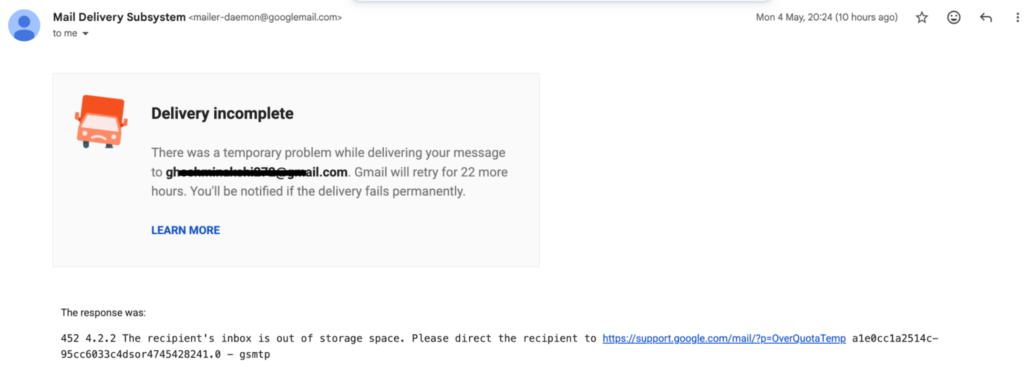
With Resend, I can track everything.
Resend Observability Tools I get:
- Delivery status for each email
- Logs of API calls
- Error details when something fails
- Insights into opens and clicks
- Events like email.delivered, email.bounced, email.complained, and email.opened help react to delivery failures in real time and maintain domain reputation.
This helps in debugging production issues faster. I no longer guess what went wrong.
API Usage Logs
We can check all the API usage logs from the logs section of Resend, which tells us exactly how our Email Sending SDK is working with the API.
Also, if we want to deep dive and see if there’s any error or for troubleshooting, we can check that here as well.
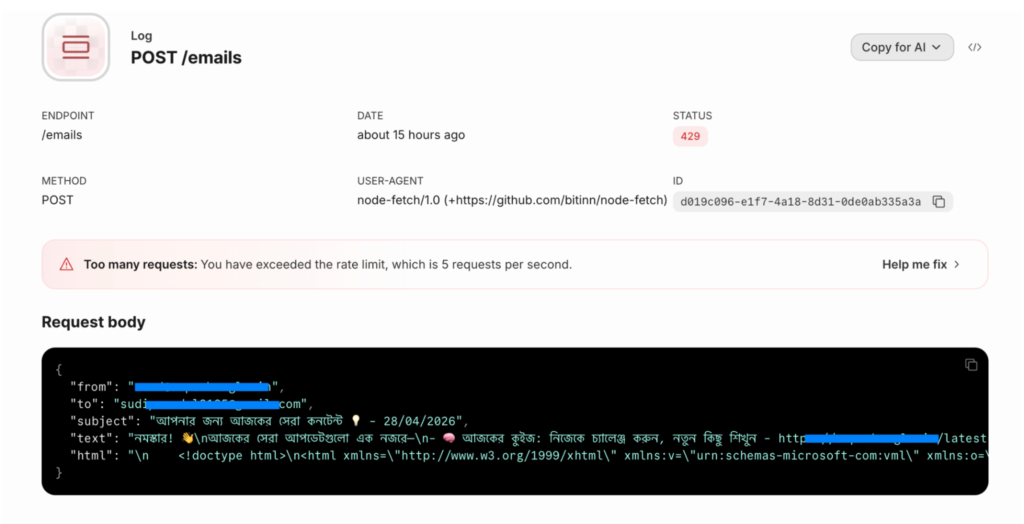
Other than the detailed information in here, one small yet interesting thing that I liked about this detailed view is that they already provide a pre-generated prompt for this error, which we can directly post on our coding agents (Copilot, etc.) to get an idea about the potential fix.
Also, check out Monitoring and Alerting for Meteor Apps in Production
Real Use Cases from My Apps
In my current apps, I use Resend for:
- Welcome emails after signup
- OTP and verification emails
- Password reset flows
- User notifications and updates
Each of these flows requires reliability and speed. Resend handles this well.
Performance and Reliability Insights
Over time, I added a few practices to improve performance,
- Sending emails asynchronously from server methods
- Adding retry logic for failed requests
- Logging every email trigger for audit
- Avoid blocking main user flows
When implementing retry strategies with Resend, it is also important to consider idempotency to avoid duplicate emails during failures or network retries. Like below:
import { Resend } from 'resend';

const resend = new Resend(process.env.RESEND_API_KEY);

await resend.emails.send(

  {
    from: '[APP_NAME] <no-reply@yourdomain.com>',
    to: 'user@example.com',
    subject: 'Your OTP Code',
    html: '<p>Your OTP is <strong>123456</strong></p>',
  },

  {
   idempotencyKey: 'otp-userId-123456',
  }
);Using an Idempotency-Key helps ensure that repeated requests do not accidentally send the same OTP, verification link, or transactional email multiple times.
This keeps the app responsive while ensuring emails are sent.
Comparing Gmail SMTP, Custom SMTP, and Resend
Here is how I look at it now:
Easy & Simple ( i.e. Gmail ) SMTP:
- Good for quick prototypes
- Limited scalability
- Poor observability
Custom SMTP setup:
- Full control
- Requires heavy maintenance
- Complex to scale
Resend:
- Easy to integrate
- Strong developer experience
- Built-in observability and reliability
For production apps, Resend feels like the right balance.
Lessons I Learned the Hard Way
A few things I wish I knew earlier:
- Always set up domain authentication early
- Do not rely on basic SMTP for scaling apps
- Logging email events saves a lot of debugging time
- Keep email sending non-blocking
- Plan for retries from day one
These small decisions make a big difference later.
Conclusion
Moving from Gmail SMTP and even custom SMTP setups with the traditional Meteor Email package changed how I think about email systems in Meteor. Emails are a core part of user communication, and they need the same attention as your database or API layer.
What I realised over time:
- Email failures are silent but very damaging to user trust
- Observability saves hours of debugging in production
- Domain setup, like SPF and DKIM, should be done early
- Retry strategies should be part of the system design
- Async email flows keep the app fast and responsive
- Maintaining your own SMTP layer adds hidden complexity over time
Resend helped me treat emails as a proper system instead of a side feature. I now have clarity on what is happening with every email that goes out. That confidence matters when your app starts scaling.
If you are still using Gmail SMTP or a custom SMTP setup with the Meteor Email package for anything beyond a small project, it is worth rethinking your approach. A better email system will directly improve reliability, user experience, and your ability to debug issues quickly.