Meteor has always had a track record for making real-time applications feel easy.
You connect a template or component to a database collection, and the interface updates the moment the data changes. No manual refresh logic, no complex event wiring, and no extra work.
But here’s something that rarely gets mentioned: the same automatic updating that makes Meteor feel so productive in the beginning can silently become one of your most significant performance concerns as your application grows — especially once it’s running in production and serving real traffic on a platform like Galaxy.
What appears to be easy at first may become more difficult to manage over time. Your app begins to feel less responsive. UI interactions that were once immediate start to show slight delays. Parts of your interface update more frequently than expected, even when just a small piece of data changes. Performance issues begin to surface, and tracing their cause is not easy.
This challenge becomes particularly interesting when working with Meteor’s two most common frontend approaches: Blaze and React. Both are capable of building fast, highly interactive applications, but they approach rendering in fundamentally different ways.
In this article, we will look at how re-rendering works in both Blaze and React, why unnecessary updates happen, and the practical strategies you can use to keep your Meteor applications fast, efficient, and responsive as they grow.
What Exactly Is a Re-render?
Before discussing how to reduce re-renders in Meteor, let’s understand what a re-render actually is.
A render is simply the browser drawing your UI for the first time. When a page loads, your framework takes your templates or components, processes the data they rely on, and converts them into visible elements in the browser, such as buttons, tables, text, forms, charts, and anything else you interact with.
A re-render happens when that interface is drawn again because something has changed, like new data arriving from the database, a reactive variable changing, a component receiving new props, or a state update inside a component
In simple terms, a re-render is the framework saying, “Something changed, so the UI needs to update to reflect the latest state.”
Meteor was built around a simple but powerful idea: when your application data changes, the interface updates automatically without requiring manual DOM manipulation.
Why Re-renders Happen in Meteor
If you’ve ever noticed your Meteor app running slowly, the UI updating more frequently than expected, re-renders are usually the root cause.
To understand why re-renders happen in Meteor, you first need to understand how Meteor’s reactive system works.
Meteor’s Reactive Data System
Meteor uses a reactive computation system powered by Tracker, the engine behind its reactivity model.
Everything reactive in Meteor, whether it’s a template helper in Blaze or a useTracker() hook in React, ultimately runs on top of Tracker.
Tracker works by recording dependencies between reactive data sources and computations. When a reactive data source changes, Tracker marks any dependent computation as invalid. That computation is then rerun during the next flush cycle to update the UI.
This process follows a dependency-based cycle:
- A computation reads a reactive data source
When a computation runs and accesses a reactive data source, it registers itself as a dependent using dep.depend(). Tracker now knows which computations should be invalidated if that data changes.
- The reactive data source changes
When the data source changes, it calls dep.changed(), which invalidates every computation that previously registered as a dependent.
- Invalidated computations are queued for rerun
The invalidated computations are not rerun immediately. Instead, Tracker marks them for rerun and places them in the queue.
- Tracker flushes and reruns computations
During the next flush cycle, which occurs automatically after the current code finishes running or when Tracker.flush() is called, Tracker reruns all invalidated computations with the latest data.
- The UI updates to reflect the new state
The updated computation results flow back into the UI, causing the affected parts of the application to update.
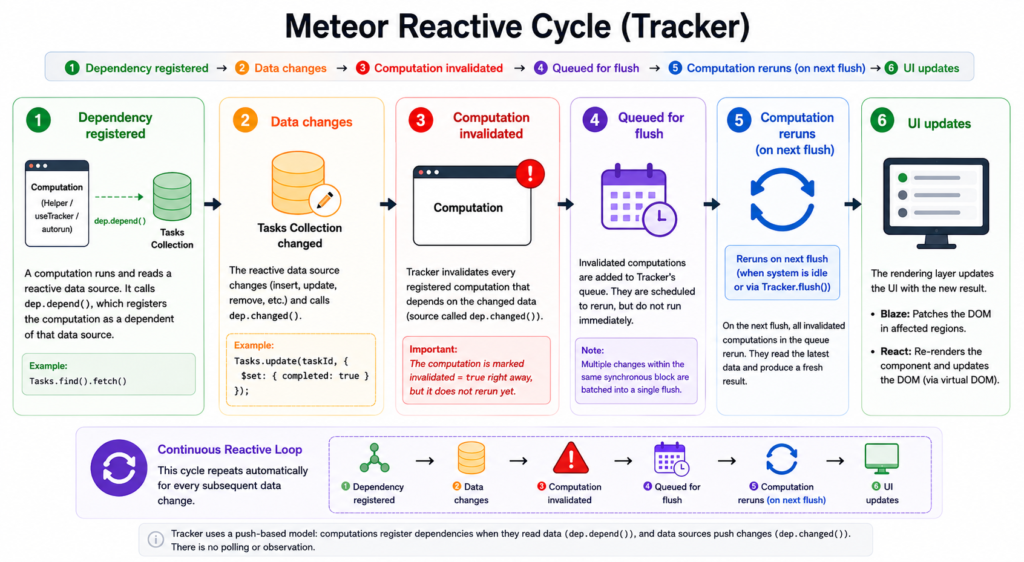
The following example demonstrates this cycle in action:
Tracker.autorun(() => {
  const tasks = Tasks.find({ completed: false }).fetch();
  console.log('Tasks updated:', tasks.length);
});This automatic rerun is what causes the re-rendering.
For example, if a new chat message is inserted into a collection, Tracker detects that any UI computation depending on that collection is now outdated. It reruns those computations, and the interface updates instantly without a page refresh.
Not every re-render is a problem. Re-renders are necessary for keeping your UI synchronized with changing data.
Unnecessary re-renders happen when more of the interface updates than it actually needs to. This usually happens because of overly broad reactive dependencies, which can cause performance issues that quietly degrade your app over time.
Common Causes of Re-renders in Meteor
These are the most common causes at the Tracker level. They apply to both Blaze templates and the React useTracker hook. React offers new triggers through its own rendering model, which we discuss in the React section.
- Broad Reactive Queries
- Reactive Data Used Too High in the UI Tree
- Reactive Variables Changing Frequently
- Repeated Helper Recomputations
- Subscription Changes
How Re-rendering Works in Blaze
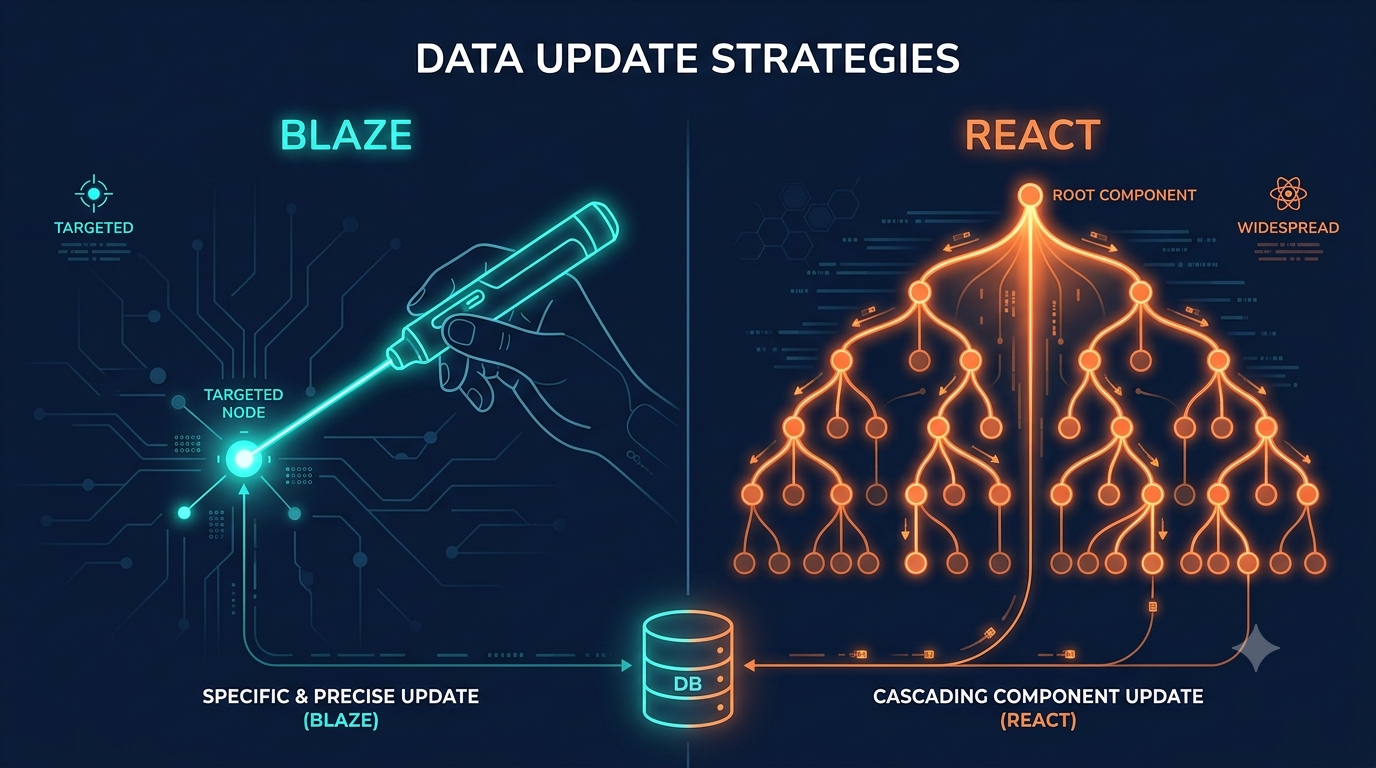
Blaze often re-renders less than people expect, yet sometimes more than you want. That balance is what makes understanding Blaze’s rendering model so important. Blaze is designed to be surgical: it just updates the specific area of the DOM that has changed.
Unlike modern UI libraries that often re-render entire component trees before determining what changed, Blaze takes a more direct approach. It reacts to data changes at the template level and updates only the specific parts of the DOM affected by those changes.
Blaze follows this cycle

What triggers Blaze re-renders
Since Blaze is built directly on top of Tracker, every reactive helper, template computation, or reactive block automatically tracks the data it depends on.
Here are common triggers in Blaze
- Changes in MongoDB Collections
This is the most common cause of Blaze re-renders in Meteor applications. When a template helper reads from a Mongo collection, that query becomes reactive:
Template.tasks.helpers({
  tasks() {
    return Tasks.find();
  }
});When this helper runs, Tracker records a dependency on the Tasks collection. This means that anything that changes the collection, an insert, update, or remove operation, will invalidate the helper. Once invalidated, the helper is scheduled to rerun in Tracker’s next flush cycle, at which point Blaze updates the affected part of the UI.
- Session Variable Changes
Session variables are convenient, but because they are global, they can accidentally trigger re-renders across unrelated parts of your app:
Session.set('selectedTab', 'settings'); Calling Session.set(‘selectedTab’, …) invalidates only the computations that read that same key via Session.get(‘selectedTab’), regardless of which template they live in. A helper reading a different key (say Session.get(‘onlineUsers’)) is not touched: Session reactivity is per-key, not global.
The real risk isn’t over-broad invalidation, but the shared namespace. Because any part of the app can read or write selectedTab, two unrelated features can pick the same key and re-render each other by accident. That’s why, for component-local state, a ReactiveDict created on the template instance is safer: the reactivity mechanism is identical (per-key), but the name is scoped so it can’t collide with the rest of the app.
- ReactiveDict changes:
ReactiveDict is a better choice than Session for component level state, because it has a more controlled scope. You can create it on the template instance rather than reaching out to a global store:
state.set('loading', true);Any helper that relies on ‘state.get(“loading”)’ is invalidated and reruns itself. Because the ReactiveDict is scoped to the template instance, it only affects helpers within that template, as opposed to Session, which triggers reactivity throughout the app.
- Subscription Readiness Changes.
Subscriptions are reactive too. When subscription data arrives, Blaze reruns dependent helpers and updates the UI with new data. This explains why templates re-render when data first arrives.
Template.tasks.onCreated(function () {
 this.subscribe('tasks');
});- Helper Dependencies on Multiple Reactive Sources
The more reactive dependencies a helper has, the more frequently it reruns. This is one of the most common hidden causes of unnecessary re-renders in Blaze. A single helper can quietly depend on several reactive sources at once:
Template.dashboard.helpers({
  stats() {
    return {
      tasks: Tasks.find().count(),
      onlineUsers: Session.get('onlineUsers'),
      loading: Template.instance().state.get('loading')
    };
  }
});The helper reruns if any one of those three values change: new task, onlineUsers, or the loading state. Each is an independent reactive dependency, so invalidating any one of them causes the entire computation to rerun.
- Tracker.autorun Recomputations
Anything inside a Tracker.autorun() reruns whenever one of its reactive dependencies changes.
Tracker.autorun(() => {
  console.log(Session.get('currentPage'));
});If currentPage changes, the entire function reruns from the top. In a template context, autoruns created inside onCreated follow the same rule, and if an autorun handles a subscription, that subscription restarts every time any of its dependencies change
Optimizing Re-renders in Blaze
Optimizing re-renders in Blaze is not about rewriting your app or introducing extra performance tools. Unlike React, where optimization often involves APIs like memo and useMemo, Blaze optimization is mostly about structure, where reactive data is read, how narrowly dependencies are scoped, and how templates are organized.
The key principle is simple: reactive reads should be as close as possible to the DOM they control and should watch only the data they actually need. When structured this way, Blaze performs fast, targeted updates. But when reactive dependencies are too broad or placed too high in the template hierarchy, a single data change can trigger unnecessary rerenders across larger parts of the UI.
Here are the most effective ways to optimize rerenders in Blaze.
- Keep Reactive Dependencies Narrow
One of the most common performance issues in Blaze comes from broad reactive dependencies. When a helper watches more data than it actually needs, it reruns more frequently than needed.
Template.tasks.helpers({
  completedTasks() {
    return Tasks.find({ completed: true });
  }
});This helper reacts only to completed tasks instead of the entire collection. Narrower queries reduce unnecessary invalidations.
- Break Large Templates into Smaller Components
Large templates usually create broad rerender boundaries. Splitting reactive logic into child templates. Smaller templates create more targeted updates.
Template.notifications.helpers({
  notifications() {
    return Notifications.find({ read: false });
  }
});Now changes to notifications re-render only that section.
- Avoid Expensive Work Inside Helpers
Helpers rerun every time their reactive dependencies change. If a helper does heavy computation, that cost is paid on every invalidation:
Template.dashboard.onCreated(function () {
  this.analyticsResult = new ReactiveVar(null);

  this.autorun(() => {
    const tasks = Tasks.find().fetch();
    this.analyticsResult.set(performHeavyCalculation(tasks));
  });
});The heavy calculation still runs when tasks change — but now it runs inside a controlled autorun, and the helper itself does nothing more than read a ReactiveVar.
- Pass Cursors to {{#each}}, Not Arrays
When you return a cursor directly from a helper, Blaze tracks each item in the list by its id. New items get new DOM nodes. Removed items have their nodes cleanly taken out. Updated items patch only the specific nodes that changed. The rest of the list is never touched:
Template.tasks.helpers({
  tasks() {
    return Tasks.find({}, { sort: { createdAt: -1 } });
  }
});Blaze can update only changed items instead of reprocessing the whole list.
- Split Helpers With Too Many Dependencies
A helper that reads from multiple reactive sources reruns whenever any of those sources change, even if the part of the UI it controls only cares about one of them. Splitting into separate helpers gives each reactive source its own isolated computation:
Template.dashboard.helpers({
  taskCount() {
    return Tasks.find().count();
  },

  userCount() {
    return Meteor.users.find().count();
  }
});Now, each helper now reacts independently.
Other ways include:
- Debounce Frequently Changing Reactive Sources
- Use Tracker.nonreactive() when needed
- Use Template Instance State Instead of Global Reactivity
How Re-rendering Works in React with Meteor
When using React with Meteor, re-rendering works differently from Blaze. While Blaze reacts directly to reactive data changes, React follows a component-based rendering model. This means that React does not re-render just because Meteor data changed. Instead, Meteor’s reactive data must be routed into a React component using tools like react-meteor-data. When that data changes, React determines whether the component needs to be re-rendered.
React re-renders a component whenever its state, props, or context change. When any of these occur, React calls the component’s render function from the top, generates a new description of how the UI should look, and compares it to the previous description using a process known as reconciliation. The DOM is then updated to reflect only the changes.
Here’s how the process goes:

What triggers React re-renders
Understanding re-renders in React starts with understanding how React thinks about UI updates.
React does not watch reactive data directly the way Blaze does. Instead, React treats the interface as a tree of components, and whenever a component receives new input through useTracker, React reruns that component to determine what should change on the screen.
Addressing these triggers is important because unnecessary re-renders in React usually come from poorly managed component inputs rather than the rendering system itself.
- State Changes
The most common trigger is a state update. When a component’s internal state updates, React re-renders that component and everything beneath it.
const [isOpen, setIsOpen] = useState(false);
setIsOpen(true); Be careful when combining useTracker() with local state updates. A reactive data change already triggers a re-render. If you update component state in response, React performs another render, increasing the amount of work done for a single update.
- Props Changes
A component re-renders whenever it receives new props from its parent.
const { tasks } = useTracker(() => ({
  tasks: Tasks.find({ completed: false }).fetch()
}));

return <TaskList tasks={tasks} />;Every time this useTracker computation reruns, .fetch() returns a brand new array even if the documents inside it haven’t changed at all.
- Parent Component Re-renders
When a parent component re-renders, all of its children re-render by default, even if their own props or data did not change.
function Dashboard() {
  const { user } = useTracker(() => ({ user: Meteor.user() }));

  return (
    <div>
      <UserHeader user={user} />
      <TaskList />
      <ActivityFeed />
    </div>
  );
}If Dashboard reruns, everything inside it reruns. TaskList and ActivityFeed do not care about user changes, but they still rerender because they are children of Dashboard.
- Context Updates
Components using React context re-render whenever that context’s value changes, even if the specific part of the context they use hasn’t changed at all.
function UserProvider({ children }) {
  const user = useTracker(() => Meteor.user());

  return (
    <UserContext.Provider value={user}>
      {children}
    </UserContext.Provider>
  );
}Every component consuming UserContext in the tree re-renders when the user document changes, including fields that components never read.
- Reactive Meteor Data via useTracker
This is the trigger most Meteor developers think about first and the one where Tracker and React’s rendering system meet directly.
const { tasks, isLoading } = useTracker(() => ({
  tasks: Tasks.find({ completed: false }).fetch(),
  isLoading: !Meteor.subscribe("tasks").ready()
}));When the Tasks collection changes, Tracker detects it, invalidates the useTracker autorun, React receives new data and the component rerenders.
- New Object and Function References
Every object, array, or function defined inline is a brand new reference in memory on every render, even if its contents are identical to the previous one.
<TaskList filters={{ completed: true, sort: "newest" }} />     // New object on every render
<TaskItem onClick={() => handleComplete(task._id)} /> // New function on every renderThis creates a new object, and a new function every render. React treats them as changed and re-renders the child.
Optimizing Re-renders in React
React does not offer surgical re-renders for free, but Blaze does. A reactive change in React re-renders a component and then goes through every child, grandchild, and sibling under it until something stops it. Nothing stops it by default.
This is the problem that optimization solves. Every solution in a Meteor + React app boils down to two things: keeping reactive computations from firing more than they need to, and preventing re-renders from going deeper down the component tree than the updated data.
Here are the most effective ways to reduce unnecessary React rerenders.
- Keep reactive data close to Where It Is Used
One of the most common mistakes is placing useTracker() too high in the component tree. When its reactive data changes, the component re-renders along with its children. By moving useTracker() closer to where the data is actually used, you can keep updates localized and avoid unnecessary re-renders throughout the UI.
function UserHeader() {
  const user = useTracker(() => Meteor.user());
  return <h1>{user?.profile?.name}</h1>;
}Now, when a document changes, only UserHeader re-renders.
- Use React.memo to Prevent Unnecessary Child Re-renders
By default, when a parent component re-renders, every child re-renders as well, regardless of whether their props changed. React.memo method breaks that default by telling React to skip re-rendering a component if its props are the same as last time.
const TaskList = React.memo(function TaskList({ tasks }) {

  return (
    <ul>
      {tasks.map(t => <TaskItem key={t._id} task={t} />)}
    </ul>
  );
});Now, TaskList only re-renders when tasks actually changed. A parent re-render that passes the same tasks reference as before skips TaskList entirely.
- Avoid Creating New Objects and Arrays Inline
React compares props by reference, not by value. An object created inline in JSX is a brand new reference on every render, and React sees it as a changed prop and re-renders the child, even if the contents are identical.
const filters = useMemo(() => ({ completed: true, sort: "newest" }), []);

return <TaskList filters={filters} />;By memoizing the object with useMemo, the same reference is returned across renders.
- Stabilize Event Handlers with useCallback
Inline arrow functions in JSX have the same problem as inline objects: a new function reference is created on every render. When those functions are passed as props to memoized child components, the children see a new reference and re-render.
const handleTaskComplete = useCallback((taskId) => {
  Tasks.update(taskId, { $set: { completed: true } });
}, []);

return <TaskItem task={task} onComplete={handleTaskComplete} />;This keeps the function reference stable.
- Split Large Components into Smaller Ones
Large components that own multiple useTracker calls and render many unrelated sections create unnecessarily wide re-render boundaries. When any reactive source in that component changes, the entire component re-renders, including sections that have nothing to do with what changed.
Moving reactive logic into smaller, focused child components gives each section its own independent re-render boundary:
function TaskList() {

  const tasks = useTracker(() =>
    Tasks.find({ completed: false }).fetch()
  );

  return (
    <ul>{tasks.map(t => <TaskItem key={t._id} task={t} />)}</ul>
  );
}

function NotificationBell() {

  const count = useTracker(() =>
    Notifications.find({ read: false }).count()
  );

  return <span className="badge">{count}</span>;
}The two components can never interfere with each other because their reactive reads live in completely separate computations.
- Narrow Your useTracker Queries
Broad reactive queries watch more of the collection than they need to, which means more writes can invalidate them, including writes to documents the component would never display. Narrowing the query to only the documents you actually need directly reduces the number of times the computation reruns.
const tasks = useTracker(() =>
  Tasks.find(
    { completed: true, assignedTo: Meteor.userId() },
    { sort: { createdAt: -1 }, limit: 20, fields: { title: 1, createdAt: 1 } }
  ).fetch()
);The fields projection is particularly worth using. If the component only displays a task’s title and date, projecting those fields means the cursor is not reactive to changes in the task’s body, tags, or comment count. Background writes to those fields won’t touch this computation at all.
- Use Keys Correctly in Lists
React uses keys to identify items in a list. When keys are stable, React can update only the items that changed. When keys are unstable, such as array indexes, React may treat unchanged items as new ones and re-render them repeatedly.
tasks.map(task => (
  <TaskItem key={task._id} task={task} />
))Using task._id as the key gives React a stable, unique identity for each item.
- Memoize Expensive Computations
By default, React reruns calculations inside a component every time it re-renders. For expensive operations like filtering large datasets or generating statistics can waste processing time.
const stats = useMemo(() => {
  return calculateHeavyStats(tasks);
}, [tasks]);This recalculates only when tasks change. Memoization reduces repeated work.
- Avoid Unnecessary State Updates
Sometimes components re-render because the state is updated with the current value.
setFilter("all"); In class components, this.setState triggers a re-render regardless of whether the new value is different. However, with useState in React 18 and above, React compares the new value to the current state using Object.is. If they are identical, React bails out and skips the re-render completely.
If all is already the current value, this update is unnecessary. Always update the state only if necessary.
Blaze vs React: Performance Comparison
Both Blaze and React are capable of building fast applications. The difference lies in how they respond to data changes and update the UI. Although the performance characteristics of the two frameworks can be different depending on the type of application you create.
| Area | Blaze | React |
| Trigger for rerender | Reactive data changes | State, props, context, or reactive data changes |
| DOM updates | Direct DOM patching | Virtual DOM reconciliation |
| Real-time updates | Excellent | Good, but depends on component structure |
| Large component trees | Can become harder to manage | Generally scales better |
| Optimization requirements | Usually minimal | Often requires memoization and component tuning |
| Update model | Reactive dependency-based | Component-based |
| Rendering scope | Affected DOM fragments only | Entire component function reruns |
Blaze often performs better in applications with frequent, small updates, such as live dashboards, chat applications, notification feeds and real-time monitoring tools. While React tends to perform better in large applications with complex user interfaces and deeply nested component structures, such as enterprise dashboards, large SaaS applications, complex admin panels, and applications with extensive client-side state management
When to Choose Blaze vs React
After comparing how Blaze and React handle re-renders, the obvious question comes up: which one should you choose for your Meteor application? The answer depends less on performance benchmarks and more on the type of application you are building. Both frameworks are capable of delivering fast, responsive user interfaces, but they take different approaches to rendering, reactivity, and application design.
Blaze is often the better choice when you want to take full advantage of Meteor’s built-in reactive data structure with the least amount of effort. Because Blaze is closely associated with Tracker, reactive updates move smoothly from the database to the user interface. You don’t have to spend much time worrying about component memoization, reference stability, or render optimization strategies. Blaze offers a beautiful, straightforward, and efficient solution for many Meteor applications, particularly dashboards, internal tools, real-time feeds, and chat systems.
React, on the other hand, tends to shine as applications grow in complexity. Its component-based architecture promotes code reuse, clear separation of concerns, and a more organized approach to creating huge interfaces. While React often requires additional attention to rendering behavior and performance optimization, it also has a solid ecosystem of libraries, tooling, and user support. For teams building large-scale applications with complex user interactions and shared state, these advantages can outweigh the additional complexity.
Ultimately, the decision is not about finding a universal winner. Blaze excels at simplicity, real-time reactivity, and getting excellent performance with minimal effort. React excels at flexibility, scalability, and managing increasingly complex user interfaces. The best choice is one that aligns with your application’s requirements, your team’s expertise, and the method you prefer to build software.
Conclusion
Re-renders are not something you eliminate in Meteor applications; they are part of how reactivity keeps your UI in sync with live data. The real challenge is not the existence of re-renders, but how wide and how often they occur.
Blaze and React both handle this in very different ways. Blaze leans on Tracker to update only the affected parts of the DOM, which makes it naturally efficient for highly reactive, real-time interfaces. However, that same automatic reactivity can become noisy if dependencies are too broad or poorly structured. React, on the other hand, gives you more control over rendering through its component model, but that control comes with responsibility, you often need to actively prevent unnecessary updates using memoization, stable references, and careful component design.
In general, Meteor performance is about understanding how data flows into the UI rather than choosing a “faster” framework. When reactive sources are tightly scoped, calculations are separated, and updates are intentional, Blaze with React may produce fast, responsive applications.
Ultimately, the key takeaway is straightforward: keep reactivity precise, components focused — and when you’re ready to run it in production, Galaxy handles the scaling and Autoscaling so your optimized app stays fast under real load.