

Twelve new features built around three things developers have been asking for: better observability, smarter deploys, and real control over your infrastructure.
If you’ve been watching Galaxy over the last few months, you’ve probably noticed the pace picking up. We’ve been shipping a lot!
The cloud hosting landscape has shifted. Teams want platforms that don’t make them choose between simplicity and control. They want logs that actually help them debug, scaling that doesn’t require a PhD in Kubernetes, and deploy pipelines that fit the way their codebase is structured.
This update is about all three. Twelve new features, organized around the things that matter most when you’re running production apps: knowing what’s happening, shipping with confidence, and keeping your data safe. Here’s everything that’s new.
TL;DR
Observability
- Runtime Logs — completely rebuilt log viewer with better search, fixed date filters, and integrated Galaxy Metal observability.
- Separated Build/Deploy and Runtime logs — no more mixing deploy-time issues with production noise.
- Custom log destinations — ship logs to Elasticsearch, OpenSearch, Datadog, or any HTTP endpoint.
- Settings.json diff in deploy history — see exactly which config changes shipped with each deploy.
Deploys & configuration
- Autoscaling — set min/max replicas and let Galaxy scale on CPU, memory, or connections.
- Hot-swap environment variables — update vars on a running app with a rolling restart, no redeploy needed.
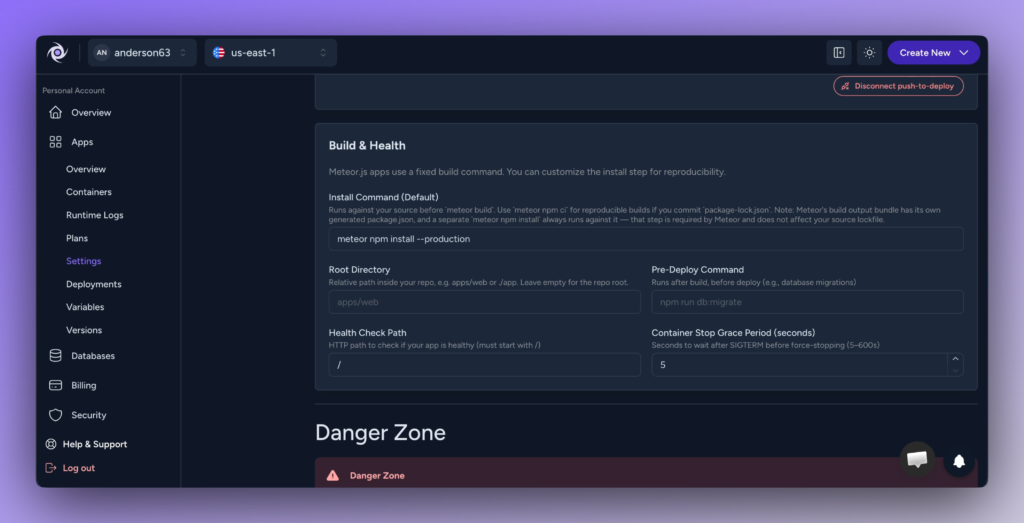
- Custom Health Check Path — point Galaxy at your /health endpoint instead of /.
- Custom Root Directory — perfect for monorepos and nested project structures.
- Custom Install Command — override the default install step when your project needs it.
- Custom Pre-Deploy Command — run migrations or seed scripts between build and deploy.
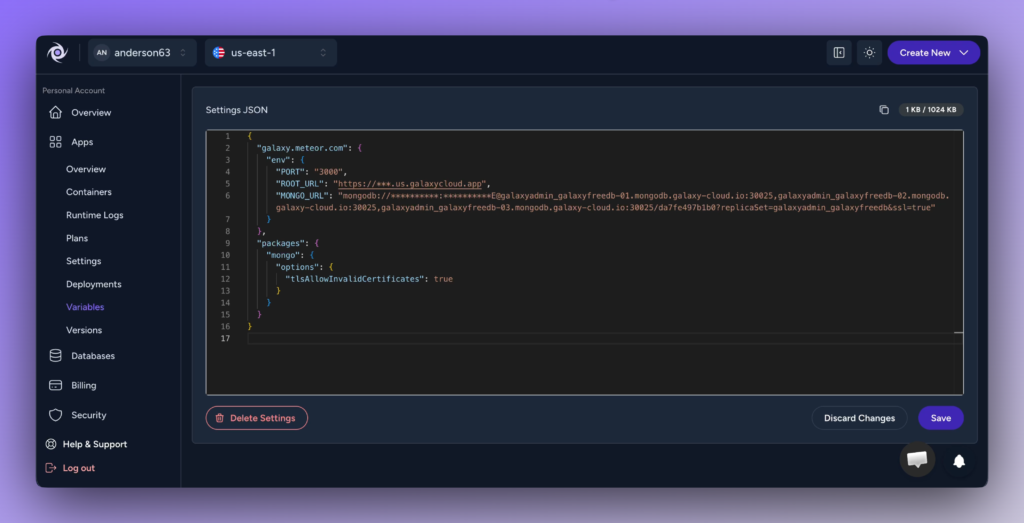
- Settings.json editor in the dashboard — edit Meteor app settings without a CLI redeploy.
Databases
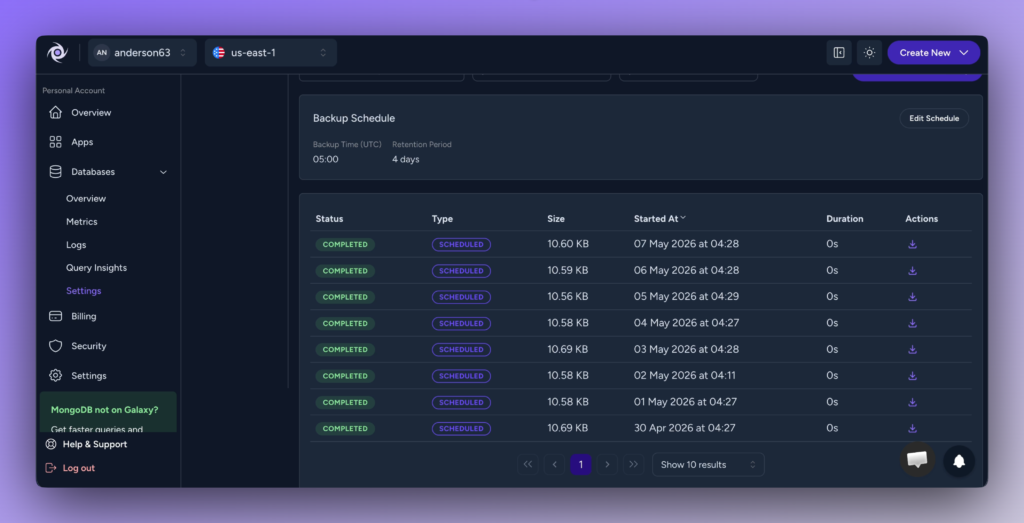
- Backup management — view backup history, trigger manual backups, download specific snapshots, and configure schedule and retention from the dashboard.
1. Observability, reimagined
If you can’t see what your app is doing, you can’t fix it. We rebuilt the entire observability stack on Galaxy from the ground up, starting with the log viewer everyone uses every day.
Runtime Logs
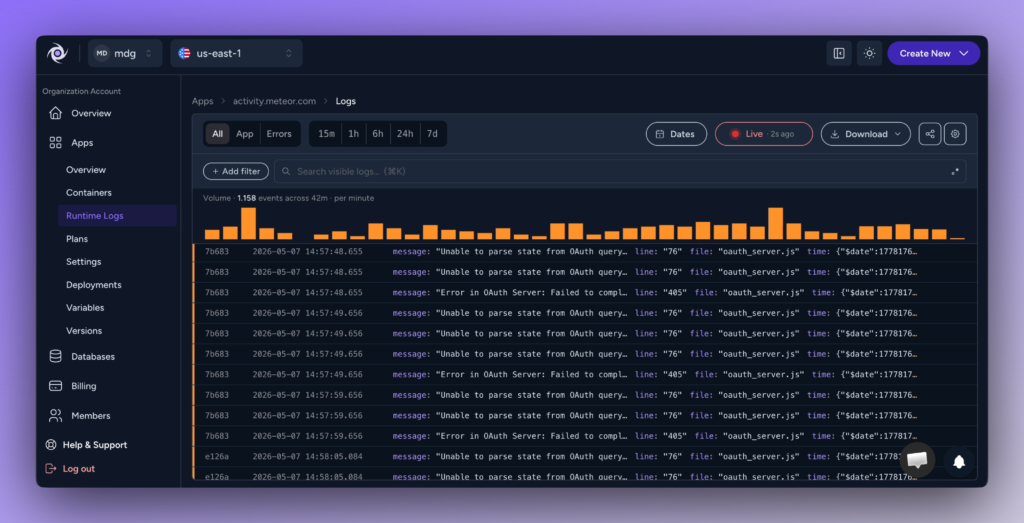
The logs screen has been completely rewritten and renamed to Runtime Logs. It’s faster, the date filter actually works now, and search performance is dramatically better — even on apps generating thousands of events per minute.
For teams on Galaxy Metal, observability is now baked directly into the dashboard. You get volume histograms, live tailing, time-range presets (15m, 1h, 6h, 24h, 7d), and an Errors-only view in one place.
Build/Deploy logs, separated from Runtime
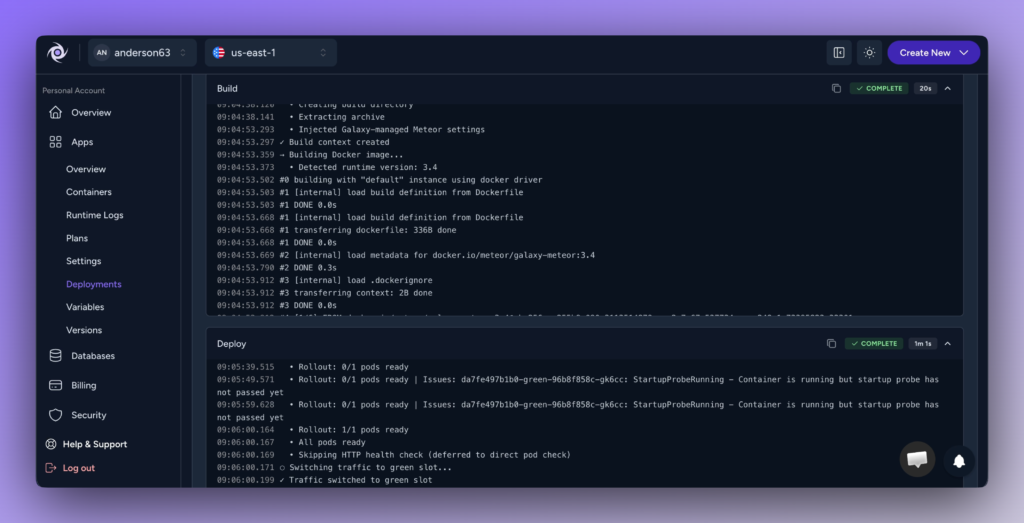
Previously, debugging a failed deploy meant scrolling through a soup of build output and production logs. Now, build and deploy logs live in their own dedicated section, separate from runtime logs.
That means when something goes wrong, you can immediately tell whether the issue happened during the build, during deploy, or in production (without losing your context).
Custom log destinations
Galaxy’s built-in log viewer is great for day-to-day debugging, but if your team already runs an observability stack, you shouldn’t have to choose.
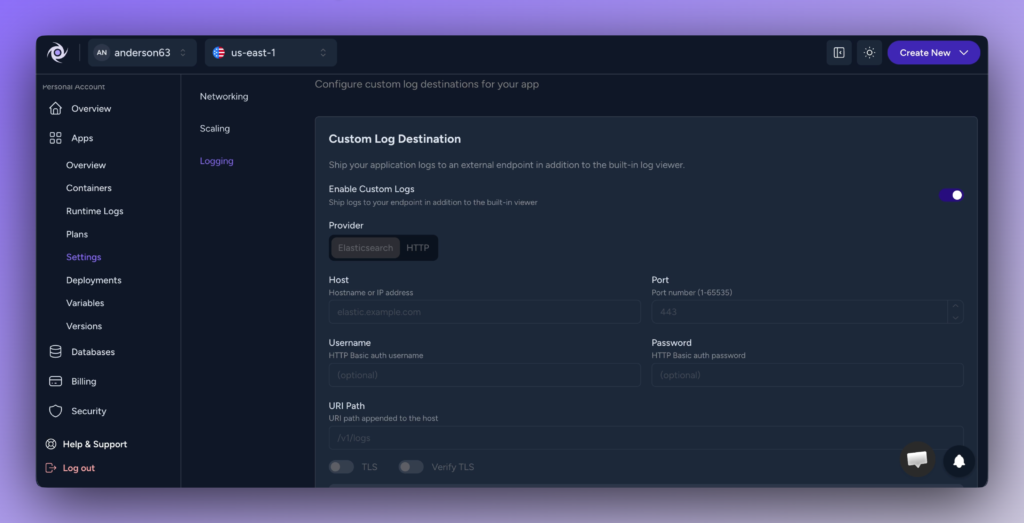
You can now ship your application logs to external services directly from the dashboard. Supported providers include Elasticsearch, OpenSearch, Datadog, and any generic HTTP endpoint. Configure host, port, auth, URI path, and TLS — all without writing custom forwarders.
Settings.json diff in deploy history
Every entry in your deploy history now shows a side-by-side diff of the settings.json used in that deploy compared to the previous one.
If a deploy introduced a regression, you can immediately see whether a config change was the culprit: no more digging through git history or guessing what changed between rollouts.
2. Smarter deploys and app configuration
Modern apps don’t fit into rigid deployment templates. Monorepos, custom health endpoints, build steps that need to run in a specific order — every team has its own setup. This release adds the configuration surface to handle all of it.
Autoscaling Basic, now on Galaxy Metal
Autoscaling has been on Galaxy for a while, but only in its Advanced form — custom triggers, fine-grained rules across CPU, RAM, connections, even day-of-week schedules — and only on the Professional plan.
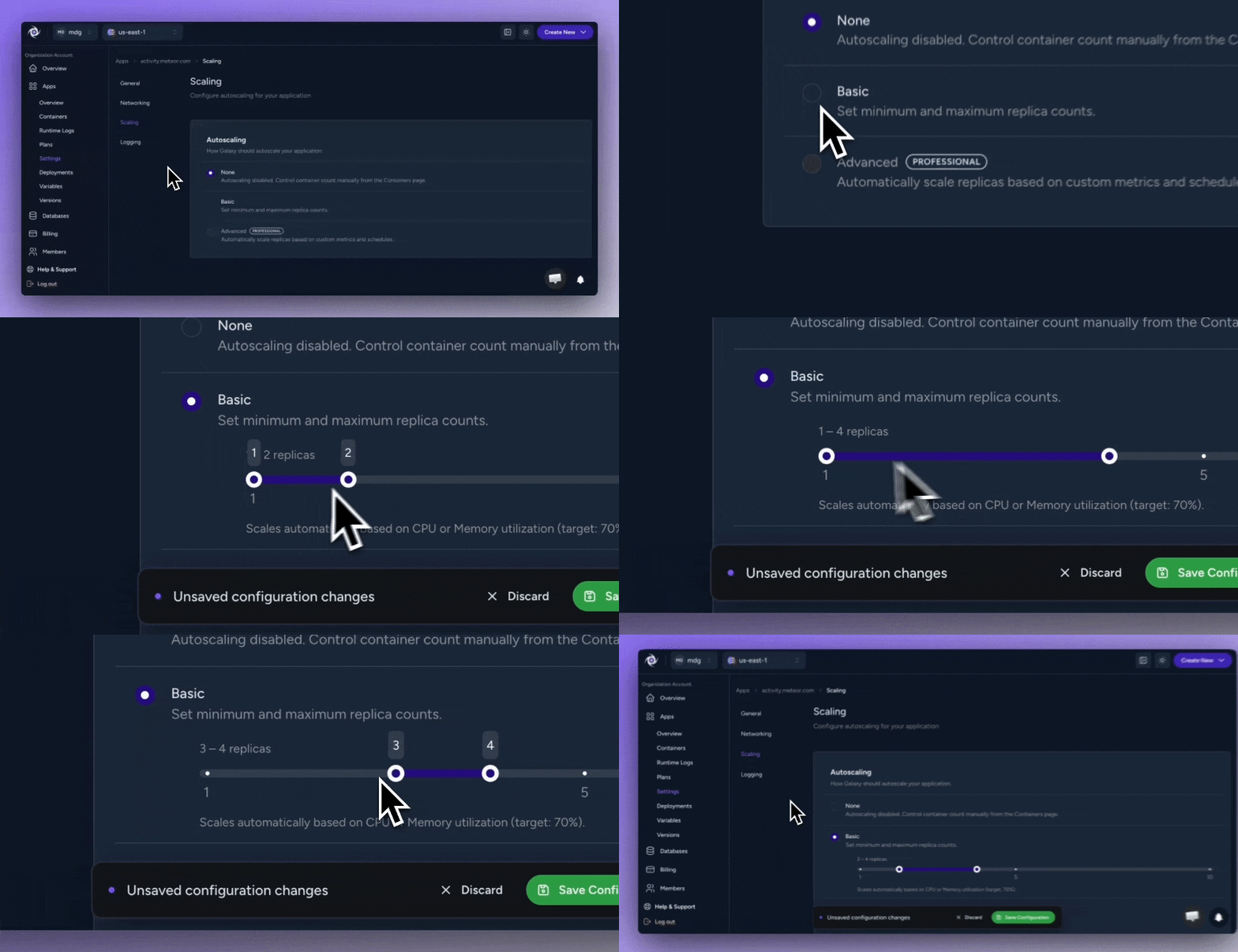
This release brings Autoscaling Basic to Galaxy Metal, available on both Essentials and Professional plans. It’s the simpler, ready-to-use version: set minimum and maximum replica counts, pick a trigger (CPU, memory, or connections), and Galaxy automatically scales your app with a target utilization of 70%.
No more manually adding containers during a traffic spike, and no more paying for idle capacity overnight. Autoscaling Advanced is coming to Galaxy Metal soon as well.
Hot-swap environment variables
Updating an environment variable used to mean a full redeploy. Not anymore.
When you change a variable on a running app, Galaxy can now perform an automatic rolling restart: zero downtime, no redeploy required. Your containers cycle through the new configuration while traffic keeps flowing. It’s the kind of operational quality-of-life feature that adds up fast when you’re managing dozens of apps.
Custom Health Check Path
By default, Galaxy hits / to check whether your container is healthy. But plenty of apps expose a dedicated health endpoint — /health, /status, /readiness — and want that to be the source of truth.
You can now configure a custom HTTP path for the container health check directly in your app settings. Galaxy will use it for startup probes, liveness checks, and rollout decisions.
Custom Root Directory
Monorepos are everywhere. So are nested project structures, where the app you actually want to deploy lives inside apps/web or services/api.
The new Root Directory field in Push to Deploy lets you point Galaxy at a subdirectory of your repo as the project root. Galaxy installs, builds, and deploys from there, that means no more restructuring repos to fit deployment tooling.
Custom Install Command
Most projects work fine with the default install step. But some need a specific flag, a different package manager, or a reproducible install with a lockfile.
The Install Command field lets you override the default. Use meteor npm ci for reproducible builds, install with a specific flag set, or run any command your project needs before the build step.
Custom Pre-Deploy Command
Database migrations. Seed scripts. Cache warming. Asset uploads. There’s always something that needs to happen between build and deploy.
The Pre-Deploy Command runs after build completes but before traffic switches to the new version — the exact window you want for database migrations or any preparation task that should block the rollout if it fails.
Settings.json editor in the dashboard
Meteor app variables and settings.json now have a dedicated section in the dashboard where you can view and edit the content directly through the interface.
It’s syntax-highlighted, shows you exactly how much of your 1 KB allowance you’re using, and saves with one click. Perfect for tweaking config in staging, rotating secrets, or testing values without rebuilding.
3. Database backups you can actually manage
A backup you can’t restore is just storage. Galaxy’s database panel now has a full backup management section, designed around the operations teams actually need to run.
Complete backup management
From the new backup panel, you can:
- View the full history of scheduled and manual backups, with status, size, and duration for each.
- Trigger a manual backup at any time — no waiting for the scheduled window.
- Download any specific backup directly to your machine.
- Configure the backup schedule (time of day in UTC) and retention period.
It’s the kind of database control plane that used to require a dedicated DBA dashboard. Now it’s one click away from your app.
What this means for your team
Taken together, this release is about closing the gap between Galaxy as a managed platform and Galaxy as a platform you can actually shape to fit your workflow.
You get the operational simplicity of managed hosting — push-to-deploy, automatic SSL, managed databases, zero infrastructure overhead — without giving up the control modern teams expect from a platform. Custom build commands, custom health checks, custom log destinations, custom everything. And when something breaks, you have the observability tooling to find it fast.
That’s the direction we’re heading: a platform that’s opinionated where it should be, and configurable everywhere it matters.
Try it now
All of these features are live today on Galaxy. Existing apps get the new dashboard automatically — no migration required. New to Galaxy? You can deploy your first Meteor, Node.js, AdonisJS, or Python app in minutes.
And if you’re still running on a platform that’s stopped investing in features like these, we’d love to help you migrate. The team is one click away.