When developing Node.js applications, most developers focus on startup logic, initializing servers, connecting databases, and handling requests. However, it’s equally important to consider what happens when your application stops.
In modern deployment environments such as Galaxy, Docker, or PM2, servers are frequently stopped, restarted, or replaced during scaling operations or updates. Without proper shutdown handling, this can result in dropped requests, broken connections, or incomplete data writes, affecting application reliability and user experience.
For example, when Galaxy deploys a new version of your app, it launches a new container and shuts down the old one. If your application doesn’t handle this process correctly, active requests may be terminated abruptly, causing failed transactions or incomplete responses.
A graceful shutdown prevents this by allowing your server to stop in a controlled manner. It lets ongoing requests finish, closes database and network connections, and terminates the process only when the system is stable. This approach minimizes downtime and preserves data integrity.
In this guide, you’ll learn how to implement a graceful shutdown mechanism in Node.js, using Express.js as an example framework for handling HTTP requests.
While Express makes it easy to create servers and manage routes, the shutdown logic relies on Node.js’s built-in process events such as SIGINT and SIGTERM.
These events allow your application to detect when it’s about to stop and perform cleanup operations before exiting.
For additional context, you can review the official Node.js process documentation.
You’ll see how to:
- Capture and handle system termination signals (SIGINT, SIGTERM)
- Close HTTP servers without interrupting in-flight requests
- Safely disconnect from databases and external services
- Integrate these techniques into your Galaxy deployment workflow for smooth restarts and zero downtime
By the end, you’ll understand how to make your Node.js applications more resilient, reliable, and production-ready, especially when running on Galaxy’s managed platform.
>Note:
SIGINT: Signal Interrupt Triggered manually (e.g., Ctrl + C) You stop your app locally during development
SIGTERM: Signal Terminate Sent by process managers (e.g., Galaxy, Docker, PM2, Kubernetes) Galaxy stops or restarts your app during deployment or scaling
Understanding Graceful Shutdown
Before implementing a graceful shutdown, it’s important to understand how Node.js reacts to termination signals.
When a Node.js process is stopped either locally or in environments such as Galaxy, Docker, or PM2, the system first sends a termination signal like SIGTERM or SIGINT to the process. These signals notify the application that it should stop running and exit gracefully.
If the application ignores these signals, Node.js will exit immediately. This abrupt termination can cause issues such as:
- Interrupted HTTP requests
- Unclosed database connections
- Incomplete background operations or file writes
This is known as an ungraceful shutdown, a sudden stop that may result in data corruption or inconsistent states.
When termination signals are received, cleaning up tasks before the process exits ensures all active operations complete successfully and your application shuts down safely.
In production environments, like Galaxy, implementing this behavior is critical for maintaining uptime, preventing data loss, and ensuring that scaling or deployment events occur without disrupting users.
Common Causes of Abrupt Shutdowns
A Node.js application can terminate for several reasons and not all of them are due to errors. In modern environments such as Galaxy, Docker, or PM2, shutdowns and restarts are routine parts of the process lifecycle. However, if they aren’t handled properly, they can interrupt active operations and create instability in production.
Below are some of the most common reasons your Node.js process might shut down:
1. Manual Termination
When a developer presses Ctrl + C in the terminal or manually stops a running process, Node.js receives a SIGINT signal.
If the application doesn’t handle this signal, it terminates immediately, dropping any in-progress requests or operations.
2. Platform-Initiated Restarts
Cloud platforms and process managers such as Galaxy, PM2, or Docker may automatically restart or replace containers during:
- Code updates or redeployments
- Scaling events (adding or removing instances)
- Resource limit resets or recovery operations
These actions send a SIGTERM signal to indicate that the process should exit.
Without graceful shutdown logic, the application stops abruptly, often resulting in timeout errors or incomplete responses.
3. Unhandled Exceptions
Unexpected runtime errors can also cause a Node.js process to crash. For example:
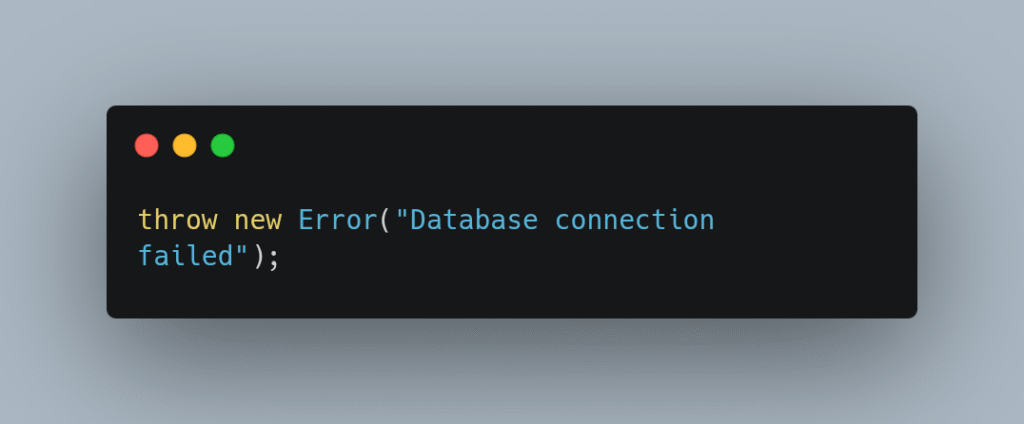
If an exception or promise rejection isn’t caught, Node.js terminates the process to prevent undefined behavior. Implementing proper error handling and fallback logic is crucial to maintaining stability.
4. System-Level Failures
Hardware issues, memory exhaustion, or container crashes can also lead to forced shutdowns. While these failures are more complex to predict, implementing cleanup routines and monitoring tools helps minimize damage and data loss.
Shutdowns are inevitable, but data loss and downtime are not.
By understanding these scenarios, you can design your application to respond intelligently when the process is about to end, rather than letting the operating system terminate it abruptly.
Setting Up a Basic Node.js Server
Before we dive into graceful shutdowns, let’s start small with a simple Node.js server. For this example, we’ll use Express.js, a lightweight and popular web framework that works seamlessly with Galaxy.
First, create a new project and install Express:
mkdir graceful-shutdown-demo

cd graceful-shutdown-demo

npm init -y

npm install expressNext, create a file called server.js and add the following code:
import express from "express";

const app = express();
const PORT = process.env.PORT || 3000;

app.get("/", (req, res) => {
  res.send("Server is running smoothly 🚀");
});

const server = app.listen(PORT, () => {
  console.log(`Server started on port ${PORT}`);
});What’s going on here:
- Express App: We’ve created a simple web server that responds to GET requests.
- Dynamic Port: The app uses process.env.PORT, allowing Galaxy (or any cloud host) to assign the correct port dynamically.
- Server Instance: app.listen() returns the HTTP server instance — something we’ll later use when handling shutdowns.
Now, if you run the app locally with:
node server.jsYou’ll see:
Server started on port 3000And if you visit http://localhost:3000, you’ll get:
Server is running smoothly 🚀When you deploy this app on Galaxy, it runs inside a managed container. Each container:
How Galaxy Runs Your App
- Starts with node server.js.
- Exposes a port managed by Galaxy.
- Receives termination signals like SIGTERM or SIGINT when Galaxy needs to stop or restart it.
This is why our next step, implementing a graceful shutdown, is essential.
Those signals tell your app, “Hey, it’s time to wrap up finish what you’re doing and shut down cleanly.”
In our next step, we’ll make sure the app listens for those signals and exits gracefully, without dropping requests or leaving connections open.
Implementing Graceful Shutdown
Now that the server is up and running, the next step is to make it resilient, able to shut down gracefully whenever Galaxy (or any container orchestrator) restarts or stops it.
This is where production readiness truly begins.
What Is Graceful Shutdown?
A graceful shutdown ensures your application stops safely and predictably. It allows the server to:
- Stop accepting new connections.
- Complete any in-flight requests.
- Clean up open resources (like databases, message queues, or file handles).
- Exit the process cleanly without data loss or incomplete operations.
Without this logic, your application could:
- Interrupt active requests (resulting in 500 errors).
- Leave open connections, leading to “address already in use” issues.
- Corrupt data or lose pending writes.
In cloud environments like Galaxy, this is even more critical since containers are routinely restarted for scaling, updates, or redeployments often without manual intervention.
Understanding Shutdown Signals
When Galaxy or Docker stops a container, it first sends a SIGTERM signal (termination request) to the Node.js process.
If the process doesn’t shut down within the platform’s grace period, it follows up with a SIGKILL, which forcefully ends execution.
To handle shutdowns gracefully, we’ll capture these signals and define how our application should respond.
Adding Graceful Shutdown Logic
Open your server.js file and update it as follows:
import express from "express";

const app = express();
const PORT = process.env.PORT || 3000;

app.get("/", (req, res) => {
  res.send("Server is running smoothly 🚀");
});

const server = app.listen(PORT, () => {
  console.log(`Server started on port ${PORT}`);
});
// Graceful shutdown logic
const shutdown = (signal) => {
console.log(`\nReceived ${signal}. Closing server gracefully...`);
server.close(() => {
console.log("✅ Server closed. Cleaning up resources...");
process.exit(0);
});
// Force shutdown if it takes too long
setTimeout(() => {
console.error("⚠️ Shutdown taking too long. Forcing exit...");
process.exit(1);
}, 10000);
};
// Capture termination signals
["SIGINT", "SIGTERM"].forEach(signal => {
process.on(signal, () => shutdown(signal));
});How It Works
- process.on(signal, callback) Listens for operating system signals like SIGTERM or SIGINT.
- server.close() Stops accepting new connections and lets existing ones complete.
- Timeout Fallback Ensures the process exits even if cleanup takes too long.
- Resource Cleanup Point Ideal place to close databases, queues, or other external services:
await mongoose.connection.close();

await redisClient.quit();Testing Locally
Run the app with:
node server.jsThen press Ctrl + C to simulate a shutdown. You should see:
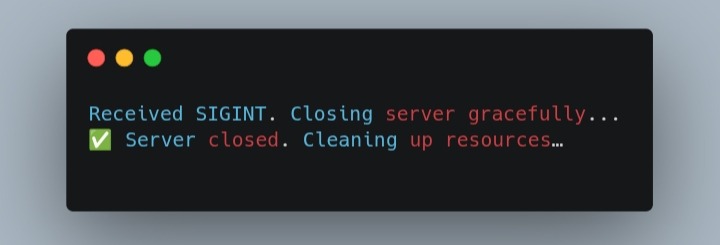
Alternatively, send a SIGTERM manually from another terminal:
kill -SIGTERM <process_id>You’ll observe the same controlled exit exactly how Galaxy will behave during restarts or deployments.
Why It Matters on Galaxy
When you deploy this app to Galaxy, the platform:
- Uses Docker containers behind the scenes.
- Sends a SIGTERM before shutting down a container
- Waits briefly before sending a SIGKILL to ensure cleanup.
By handling these signals properly, your application can finish ongoing requests, close connections, and exit gracefully leading to:
- Higher API uptime.
- Fewer user-facing errors during deployments.
- Cleaner logs with fewer failed requests.
Integrating Graceful Shutdown with Galaxy Deployment
When you deploy your Node.js app to Galaxy, it runs inside a managed Docker container. Every time you push an update, scale your app, or redeploy, it quietly spins up new containers and retires the old ones behind the scenes.
Before those old containers are stopped, Galaxy sends a termination signal (SIGTERM) to your app, giving it a short window to wrap things up cleanly.
If your app ignores that signal, it will eventually force the container to shut down. That means in-progress requests might get dropped, user sessions could be interrupted, or database connections left hanging. Not exactly production-friendly.
That’s where graceful shutdown logic comes in it gives your app a chance to:
- Finish active requests
- Close open connections
- Release any held resources
- Exit cleanly
With this setup, Galaxy can replace containers without downtime. Old containers finish their work before shutting down, while new ones are already booted and ready to take over keeping your users online and happy.
Under the hood, the platform relies on Docker’s process lifecycle, which plays nicely with Node.js signal handling. By listening for SIGINT and SIGTERM, your app becomes aware of when it’s being stopped and can shut down on its own terms.
If you want to take this a step further, consider adding PM2 inside your Galaxy container. It gives you production perks like monitoring, clustering, and automatic restarts making your Node.js app more resilient and self-healing.
Together, PM2 and Galaxy form a powerful combo: it handles container orchestration, while PM2 keeps your processes stable inside each container. That’s a solid recipe for zero-downtime deployments.
Handling Runtime Exceptions
Even the most stable applications can encounter unexpected errors at runtime. In Node.js, two types of errors can cause your process to crash if not handled:
- uncaughtException – Synchronous errors that aren’t caught in any try/catch block.
- unhandledRejection – Promise rejections that don’t have a .catch() handler.
By default, these errors terminate the Node.js process immediately, which can interrupt ongoing requests or leave resources like database connections in inconsistent states. In a production environment such as Galaxy, this can disrupt users and cause partial data writes.
To prevent this, you should attach global event listeners at the top level of your main server file (for example, server.js or app.js). This ensures that any unhandled error, no matter where it occurs, is caught and triggers a controlled shutdown. It also allows your graceful shutdown logic to handle all exit scenarios consistently.
Here’s how it looks in practice:
process.on("uncaughtException", (error) => {
  console.error("Uncaught Exception:", error);
  gracefulShutdown("uncaughtException");
});

process.on("unhandledRejection", (reason, promise) => {
  console.error("Unhandled Rejection at:", promise, "reason:", reason);
  gracefulShutdown("unhandledRejection");
});These handlers work best when combined with your existing signal-based shutdown logic (handling SIGINT and SIGTERM). By centralizing all shutdown routines into a single gracefulShutdown() function, your application can:
- Log detailed error information using tools like Winston.
- Close database connections, HTTP servers, and other resources safely.
- Exit in a controlled manner, allowing Galaxy or PM2 to automatically restart a fresh, stable instance.
Best Practice: Never attempt to continue running after a critical runtime error. A controlled exit is safer than leaving the application in an unstable state.
With this setup, your Node.js app becomes resilient: it gracefully handles unexpected errors and integrates seamlessly with Galaxy’s container lifecycle, maintaining uptime and reliability for your users.
Testing the Shutdown Flow
Once you’ve implemented graceful shutdown and runtime exception handlers, it’s important to test everything before deploying to Galaxy. Proper testing ensures your app behaves correctly and cleans up resources safely. Specifically, you want to confirm that:
- Active requests finish without interruption.
- Database connections and other resources close properly.
- Logs capture shutdown events for monitoring.
1. Simulate Shutdown Signals
Node.js allows you to send termination signals directly to your process just like Galaxy would during deployments.
- Start your server:
node server.js- In a new terminal tab, send a SIGTERM to the server:
kill -SIGTERM <PID>Replace <PID> with the process ID shown when your server starts.
You can also simulate SIGINT by pressing Ctrl + C in the terminal where the server is running.
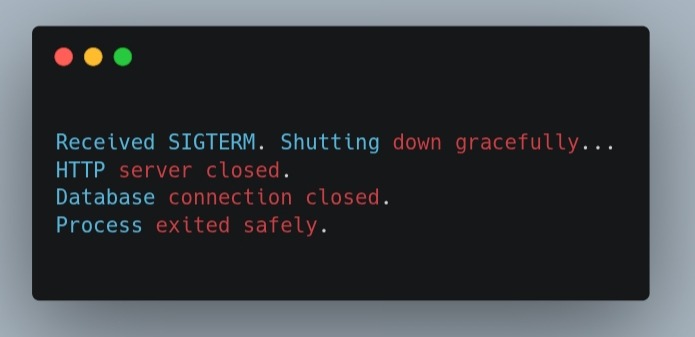
Your app should log messages similar to:
2. Test Resource Cleanup
- Make sure your shutdown function cleans up all resources:
- HTTP requests: Open a browser or use curl to make requests while sending shutdown signals. In-flight requests should complete before the server exits.
- Database connections: Verify that any active connections are closed. Add log statements in your disconnect callbacks to confirm.
- Logs: Check that all shutdown steps are properly recorded if you’re using a logging tool like Winston.
3. Observe Logs for a Safe Exit
Logs are crucial to verify your shutdown flow. You should see:
1. Signal received (SIGINT or SIGTERM).
2. Cleanup actions executed (HTTP server closed, DB disconnected).
3. Controlled exit with process.exit().
If any step is missing, revisit your gracefulShutdown() function to ensure all resources are properly handled.
Quick Tip: Test Runtime Errors
You can also simulate unhandled exceptions or rejected promises to test your global error handlers:
// Simulate uncaught exception
setTimeout(() => {
  throw new Error("Simulated crash!");
}, 2000);

// Simulate unhandled rejection
Promise.reject("Simulated promise rejection!");Your server should trigger the same gracefulShutdown() sequence, confirming that runtime errors are handled safely.
By testing these scenarios locally, you can be confident that when deploying on Galaxy, your app will handle updates, container restarts, and unexpected errors without disrupting users.
Best Practices for Production
Implementing graceful shutdown and runtime exception handling is a great start, but there are several additional practices that make your Node.js apps more reliable, maintainable, and production-ready especially when running on Galaxy.
1. Centralize Shutdown Logic
Keep all shutdown routines signal handling, resource cleanup, and error handling in a single function, like gracefulShutdown().
This ensures that every exit path (SIGTERM, SIGINT, uncaughtException, unhandledRejection) behaves consistently and avoids duplicated code.
2. Use Logging for Observability
Integrate a logging library like Winston to capture shutdown events and runtime errors.
import winston from "winston";

const logger = winston.createLogger({
  level: "info",
  transports: [new winston.transports.Console()],
});

logger.info("Received SIGTERM, initiating shutdown...");Logging signal-based exits and exception-triggered shutdowns gives visibility into your app’s behavior and makes troubleshooting production incidents much easier particularly in Galaxy’s containerized environment.
3. Avoid Long-Running Operations During Shutdown
During shutdown, focus only on completing in-flight requests and cleaning up resources.
Heavy computations or long asynchronous tasks can delay container termination and interfere with Galaxy’s deployment workflow. Keep shutdown logic lean and fast.
4. Implement Health Checks
If your app sits behind a load balancer or runs multiple Galaxy containers, use readiness and liveness checks.
Before shutting down, mark the server as unavailable to prevent new requests from reaching it while existing connections finish this ensures users experience zero downtime.
5. Monitor and Test Regularly
Test shutdown behavior locally, in staging, and even under load to confirm everything works as expected.
Monitor logs and metrics in production to catch early signs of:
- Unhandled exceptions
- Slow shutdowns
- Resource leaks
Proactive testing helps prevent unexpected downtime during Galaxy deployments.
6. Use a Process Manager When Needed
While Galaxy manages container lifecycles automatically, a process manager like PM2 can add extra resilience:
- Automatic restarts for crashed processes
- Clustering for high availability
- Advanced logging and metrics
Even if you don’t use PM2 on Galaxy, these practices are still relevant for on-premises or hybrid setups.
Summary
Following these best practices ensures your Node.js applications:
- Exit gracefully every time, minimizing downtime.
- Capture and log runtime errors for easier debugging.
- Safely release resources like databases, sockets, and file handlers.
- Handle Galaxy deployments and container restarts smoothly, keeping users unaffected.
By combining signal handling, runtime exception management, and these production best practices, your Node.js apps achieve stability, maintainability, and professionalism exactly what you want for a reliable production deployment on Galaxy.
Conclusion
Graceful shutdown and robust runtime exception handling are essential for any production-ready Node.js application. In modern deployment environments like Galaxy, Docker, or PM2-managed containers, apps are frequently stopped, restarted, or scaled dynamically. Without proper shutdown logic, abrupt terminations can result in dropped requests, unclosed database connections, or inconsistent application states all of which hurt user experience and reliability.
In this article, we covered the key steps to make your Node.js apps resilient:
- Understanding graceful shutdown: How termination signals like SIGINT and SIGTERM tell your app to exit safely.
- Implementing shutdown logic: Closing HTTP servers, completing in-flight requests, and releasing resources properly.
- Handling runtime exceptions: Capturing uncaught exceptions and unhandled promise rejections to prevent crashes.
- Testing the flow: Simulating shutdown signals locally to ensure proper cleanup and logging.
- Best practices: Centralizing shutdown logic, using logging tools like Winston, avoiding long-running tasks during shutdown, and integrating health checks for load-balanced setups.
By following these strategies, Node.js apps on Galaxy can achieve:
- Zero-downtime deployments: Containers restart or scale seamlessly without interrupting users.
- Predictable exits: Runtime errors are logged and handled gracefully, giving you visibility into potential issues.
- Reliable resource management: Databases, file handlers, and background tasks are safely closed during shutdown.
Ultimately, these practices ensure that your apps are stable, maintainable, and professional, ready to thrive in cloud environments like Galaxy. They protect users from service interruptions, make deployments more predictable, and give you confidence in your application’s reliability.
🚀 Next Step: With these techniques in place, you can deploy Node.js apps to Galaxy knowing they can gracefully handle real-world production challenges from routine container restarts to unexpected runtime errors.